Grail Controls
Mouse-first inputs for a game that plays the cards for you.
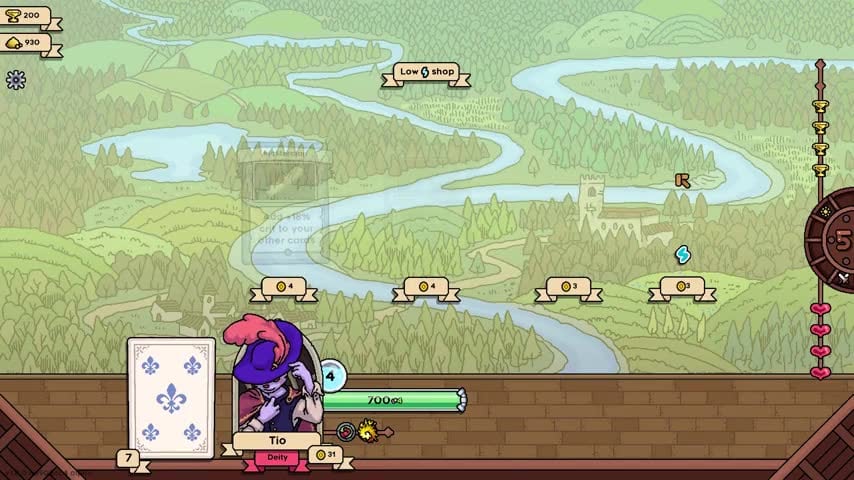
Grail is built so you can play it without timed inputs. Steam lists mouse-only, adjustable text, custom volume, save-anytime, camera comfort, and play-at-your-own-pace flags. Combat does not ask you to click a card at the right millisecond. Your clicks are all on the river, in shops, and in menus. This page is the input sheet. If you need the rules behind those clicks, go to how to play.
Mouse on the overworld
- Click a node on the river to travel there if you can pay the banner price.
- Skip on event prompts (mushroom trades, weird strangers) when the reward does not match the engine.
- Portrait / deck back at the bottom left opens the deck. Count cards here before you shop. A number like 7 on the badge is your current size.
- Pause sits on the lower left during fights if you need to read a card that flew by.
- Magnifiers on the corners open inspect views for the opponent and yourself during combat.
Gold, trophies, health, and the day clock are information, not buttons. Hearts on the right are the player-battle scoreboard explained in how to win a run.
Mouse in shops and the blacksmith
Click a card to inspect, click buy if you can afford it, click sell if you want it out of the deck. Selling is always available, including starter Jab once you have a real attacker. That is the most important “control” in the game and it is just a sell button. New players forget it exists and then complain about energy. See energy and cards.
At the anvil, click the card you intend to upgrade. Confirm whether a blister (locked sticker) is part of the deal before you accept. Upgrades and enchantments covers when to refuse.
Traits: hold to remove
You may hold three traits. The game tells you that you can remove one by pressing and holding the trait. That is not a tooltip people remember at 1 a.m. If a trait names cheese and you sold the last cheese card, hold-remove it. Do not keep a dead passive because the slot “feels full.” Rankings are on the trait tier list.
Combat: mostly watch
There is no retarget. There is no pause-buffer to swap order. You watch pips fill. If you need to read a card, use pause or the inspect magnifier. Speed increases after reshuffles; that is automatic. The 40-turn health drain is automatic. Your only combat “control” is the deck you brought.
Keyboard and controller
Steam marks mouse-only as a supported path. A GameMaker title of this size typically also accepts basic keyboard confirm/cancel, but Sokpop has not published a public keybind table the way a shooter would. If you play with a controller, treat it as cursor + confirm. Do not hunt for a hidden “play this card” button. There is not one.
If you rebound something in a community patch and fights stop resolving, reset bindings before you blame the energy system.
Accessibility that changes how you play
- Adjustable text — turn it up before you try to read pip counts on a 1080p TV.
- Custom volume — the soundtrack is a talking point in the demo comments; you can keep it without drowning tooltips.
- Save anytime / play at your own pace — close the game between nodes. Snapshot PvP does not require you to stay online.
- Playable without timed input — if a node feels timed, it is a misread. Events wait.
Cardopedia and collections
Open the cardopedia from the menu to filter rarity, lore, alt art, and (as of 1.0) traits. This is a collection screen, not a loadout screen. You do not equip a cardopedia entry. You buy the physical card on the river. Lore unlocks by winning with different cards; that is a long-term goal, not a first-run control.
Cosmetics chests are a separate click path spent with trophies. Do not confuse “open chest” with “upgrade card.”
First-session click order
- Finish the remade tutorial without skipping tooltips about pips.
- Open the deck once on the river so you know how to find it.
- Sell nothing yet; fight one monster.
- Sell the card that did not play.
- Hold-remove a trait only after you are sure it does not match the remaining cards.
If a click did nothing, you are probably in combat waiting on energy. That is not a control bug. Read getting started and then go back to the map. For Steam install, languages, and the official store, use the links hub.
Frequently Asked Questions
Quick answers to the most common questions.
Is there a button to play a card?
No. Cards play when their energy pips fill. You click on the map, in shops, and in menus.
How do I remove a trait?
Hold the trait. You can keep three. Remove any trait that names a card type you no longer own.
Can I sell cards after a fight?
Yes. Sell whenever you want. Cutting a starter attack is a normal cleanup.
Does Grail require fast clicking?
No. Steam lists playable without timed input and play at your own pace. Combat is automatic.
Where is the deck view?
The card back and portrait area at the bottom of the overworld. Open it before you shop so you know your count.